Summarize Web Pages and Add Events to Your Schedule... NAVER Launches 'AI Chat' for Naver Whale
- Input
- 2026-10-01 10:06:37
- Updated
- 2026-10-01 10:06:37
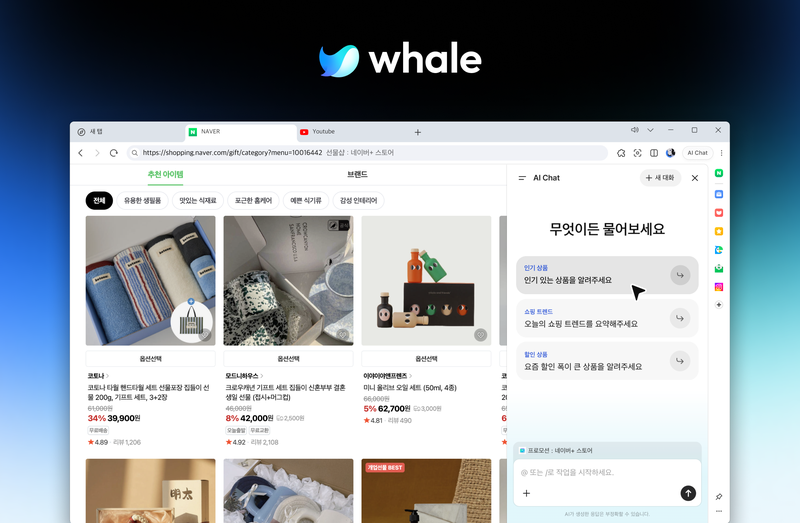
[Financial News] NAVER has introduced a feature to its Whale browser that uses artificial intelligence (AI) to read and summarize web pages, translate content, and even manage schedules. Users can access AI on the page they are viewing without separately copying content or navigating to another screen.
NAVER announced on the first that it had launched the AI Chat feature on its Naver Whale browser.
AI Chat answers questions based on the page currently being viewed or a tab selected by the user. Without requiring users to enter a page address or paste its contents, the feature allows them to request summaries of long articles or translations of foreign-language pages from the sidebar. Users can ask follow-up questions after reviewing an answer or save useful responses to Scrapbook.
The feature is also linked to the existing QuickSearch function. After selecting a sentence or specific section on a web page, users can choose AI Chat in QuickSearch to start a conversation based on that content.
AI Chat can also execute tasks within the browser. Users can ask it to organize open tabs or connect to Naver Calendar to check, add, or edit events. Some tasks, including adding events, require user confirmation before they are carried out.
Depending on the page being viewed, AI Chat may proactively suggest relevant functions. For example, it can suggest translation on a foreign-language page and summarization on a page containing a long text.
Whale also revamped its brand logo and slogan to mark its 10th anniversary. The new slogan is 'Journey to the Next AI Browsing.' The company refined its existing whale-inspired symbol and changed its signature color to a deep-blue palette.
Hyo Kim, leader of Naver Whale, said, "We will continue to advance the service's features in line with users' experiences and needs."
[email protected] Choi Hye-rim Reporter