Choose the AI You Want: Bixby, Gemini, and Even Perplexity Now Supported [Galaxy S26 Unpacked]
- Input
- 2026-02-26 03:00:00
- Updated
- 2026-02-26 03:00:00
■ AI proactively suggests what you need... Side-view blocking when entering passwords
The defining trait of the Samsung Galaxy S26 series AI is its “proactive personalization.” It first understands the user’s mobile usage context and intent, then offers support accordingly.
A key feature that embodies this is “Now Nudge.” For example, if your mother writes in a family group chat, “Send me the New Year’s bow photos,” you can tap the rounded nudge icon that appears in the input field to instantly find and share the photos. Previously, you had to open the Gallery app, search for the photos, and then share them, but this process has now been streamlined.
The “Now Brief” feature, which provides personalized briefings based on user data, has also been enhanced. It offers a comprehensive overview of your day, including calendar reminders and transportation information.
The lineup of AI agents now includes Perplexity in addition to the existing Bixby and Gemini. Bixby uses voice-based natural language to control device settings. For instance, if you say, “The battery is at 30%, switch to a mode that lets it last longer,” it will automatically adjust the relevant settings. Gemini can handle location-based requests such as, “Call a taxi here,” with a single command.
The Samsung Galaxy S26 Ultra is the first in the mobile industry to feature a built-in privacy protection function. Even without attaching a privacy screen protector film, people next to you cannot see your phone’s display thanks to side-view blocking. You can configure it to activate only under specific conditions, such as when entering passwords or using financial apps.
■ Betting on a 2-nanometer AP... Exynos returns
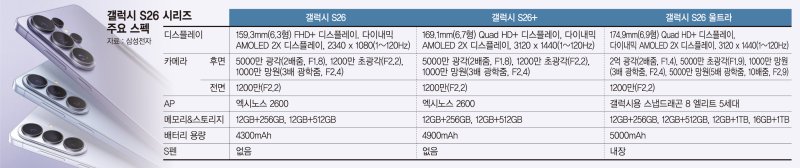
For the AP, which serves as the smartphone’s brain, the base and Plus models are equipped with Samsung’s in-house Exynos 2600 chipset, while the Ultra model uses Qualcomm’s Snapdragon 8 Elite Gen 5.
The Exynos 2600 was designed by the System LSI unit within the Samsung Electronics Device Solutions (DS) Division and manufactured by Samsung Foundry using a 2-nanometer (nm, 1 nm = one-billionth of a meter) process based on Gate-All-Around (GAA) technology. It is the first AP in the industry to adopt a 2 nm GAA process. Due to past overheating issues, Samsung Exynos was not used in the S25. With the Samsung Galaxy S26 series, Samsung has brought back the Exynos 2600 in an effort to restore its reputation.
The Snapdragon 8 Elite Gen 5 used in the Samsung Galaxy S26 Ultra delivers a 39% improvement in neural processing unit (NPU) performance over its predecessor, while central processing unit (CPU) and graphics processing unit (GPU) performance have increased by up to 19% and 24%, respectively.
The Samsung Galaxy S26 series also features Samsung’s image enhancement solution, the mobile Digital Natural Image engine (mDNIe), which renders colors with greater nuance and realism. It supports Super Fast Charging 3.0, allowing the battery to reach up to 75% in just 30 minutes of charging.
Notably, it is the first smartphone to adopt a “Privacy Display” that limits side viewing angles. Users can directly set when it activates and what it applies to, such as when entering PIN codes, passwords, or unlock patterns that involve sensitive information. There is also an option to selectively hide only notification pop-ups.
■ 200-megapixel camera and pro video codec... Camera upgrades
The camera and AI features of the Samsung Galaxy S26 are designed so that everyday users can venture into professional territory. The Samsung Galaxy S26 Ultra comes with a 200-megapixel wide-angle camera and a 50-megapixel telephoto camera offering an optical zoom level equivalent to 10x. With a wider aperture than the previous model, it delivers clearer shots even in low-light environments. However, the camera performance of the S26 and S26+ remains the same as their predecessors.
For the first time on a Galaxy device, Samsung supports the Advanced Professional Video (APV) codec for professional-grade video production. This minimizes quality loss even after multiple rounds of editing. The “Super Steady” stabilization feature for video recording now includes a new horizon lock option, helping users maintain stable framing while shooting on the move.
pride@fnnews.com Reporter